In addition to the HUI-VUI, I’ve discovered another thing that happens every six years: I purchase a new GPS bike computer. In this case, we’re talking the Garmin Edge 840 Solar, which I picked up last month after it came out back in April. A new GPS head unit is a really big deal for someone who spends as much time in the saddle as I do.

The Garmin Edge 840 Solar

Before diving into the new unit, let’s look at how far we’ve come. I first used a GPS to log bike rides waay back in 2000, using Garmin’s original yellow eTrex handheld, but the tech back then was so primitive that it didn’t have maps or routes or points of interest; just a blank monochrome 64 x 128 pixel LCD with a breadcrumb trail of where you had gone, and even that initially suffered from “Selective Availability”: an intentional inaccuracy imposed by the government on civilian GPS signals. Six years later I grabbed an eTrex Vista (my review), which had finally added color and some very rudimentary maps. In 2011 Garmin released the cycling-specific Edge 800, then 2017’s Edge 820 (my review), and this year’s Edge 840.

Along the way, I’ve watched these units evolve into incredibly useful and sophisticated navigational and analytical tools. Garmin updates their cycling products about every three years, so I’ve usually skipped a generation (e.g., the Edge 810 and Edge 830). So when I buy a new unit, there are some substantial improvements and compelling new features to check out.

And by that point, my old unit is usually pretty worn out. That was certainly true of my loyal old Edge 820. To begin with, its touch screen – a novelty at the time – was very sluggish, and the processor took forever to calculate routes or pan and zoom the map display. And the Micro USB connector was outdated technology from the start. After a few years the screen faded significantly, leaving a prominent grid of its LCD guts showing through its faint display. And its battery life – originally billed as lasting 15 hours – had shrunk to about 90 minutes. These were the shortcomings that I expected the new Edge 840 to fix.

With that, let’s look at the new beast. As always, I’ll divide this review into four sections: things I’m neutral about; features I don’t know much about because I didn’t test them; features I’m excited about; and the things that already disappoint me. With an executive summary at the end.

The Neutrals

My main display: speed, distance, with power and heart rate charts

My main display: speed, distance, with power and heart rate charts

One of the most noticeable changes is a revamped UI. It works fine. Its organization of functions isn’t 100% intuitive. And it’s still based on “activity profiles” rather than gear, which has always seemed a bit clunky to me.

The unit also supports phone-based configuration. I really don’t see a ton of value in that over configuring the unit on a computer or the device itself.

Potentially useful features include alerts for upcoming sharp turns and high-speed roads. But the high-speed road alerts arrive way too late to be actionable (e.g. navigating to avoid them). And the last thing you want when speeding around a sharp turn is having to read and dismiss an alert popping up on your head unit. They’re nice ideas, but not practical (at least not with the current implementation).

An unexpected surprise was that when following a route, the GPS can now have your phone verbally announce navigational cues as you approach them. “In fifty meters turn right on Mesa Drive.” Another cool idea, but they’re just not intelligible when your phone is stuffed into a jersey pocket on your back.

The unit can also walk you through a heart rate variability stress test. This isn’t for general health purposes, but for telling you how well or poorly you have recovered from your previous rides. That’s not something I need to wait around for three minutes for a device to tell me.

The Cycling Ability feature can tell you what your general cycling strengths and weaknesses are, as a very gross training aid. Garmin doesn’t add much value by telling me that I’m an endurance specialist.

Same with their measurement of heat acclimation. A simple percentage is way too simplistic to be of any actionable value.

Another hamstrung feature is showing the battery status for all your sensors (e.g. heart rate monitor, electronic shifters, power meter), where you really need more discrete battery levels than “okay” and “dead”.

There’s also a ton of features that I don’t really care much about, but you might. But to be honest I really don’t have any opinion about things like incident detection, structured training plans, mountain biking metrics, hydration alerts, an integrated bike alarm, lost device finder, etc.

The Unknowns

It might surprise you that I didn’t bother testing the unit’s integration with my indoor trainer. But the only useful function that provides would be the ability to simulate the gradients of riding a known real-world course, which isn’t as engaging as riding in the richer worlds on Zwift.

The Power Guide feature gives you a plan for specific power numbers to match when following a particular route. Just not something I’m likely to want.

Same story with the Event Training Plan feature. I hate structured training and already know how to build and taper for a major event. Not something I need, and not something I’d look to a head unit to provide.

There’s also the new and very promising Group Ride feature, which lets groups of riders share their route, in-ride messages, and live map with everyone’s location. This sounds like a really awesome feature if a critical number of rides and riders adopt it, although it’s limited to Garmin’s most recent units. It’s only in my “Unknowns” section because I haven’t had any opportunity to test it out.

The Positives

My customized boot screen

My customized boot screen

Solar power gain, showing 71 minutes gained over a 9-hour ride

Solar power gain, showing 71 minutes gained over a 9-hour ride

ClimbPro displaying map, elevation profile, current grade and power

ClimbPro displaying map, elevation profile, current grade and power

Real-Time Stamina, estimating 21% or 17km remaining before bonking

Real-Time Stamina, estimating 21% or 17km remaining before bonking

Let’s start with the basics: critical things my Edge 820 did that the 840 still does. I can still download my activity FIT data files to my laptop, as mentioned above. It still communicates with my Di2 electronic shifting and displays what gear combination I’m in. I can still capture screen shots, as you can see at right. I can still set the text that appears on the startup screen. And you can still charge it from a portable USB battery while using it. Good!

Then there’s things that aren’t new, but are features the Edge 840 has improved upon. Starting with the most important improvement: battery duration is now listed at 32 to 60 hours! The touch screen is so much more responsive that it’s actually usable now! Panning and zooming maps is reasonably quick! Calculating and re-calculating routes takes a second or two instead of five to ten minutes! Adding the GNSS GPS system improves GPS accuracy in cities and other challenging areas! And while my old unit would show alerts when calls or text messages came in, the 840 also shows email and all other phone notifications! Very nice!

The passive solar receiver adds around 8 to 10 minutes of extra power per hour in Texas sun, which might not be a huge deal for folks in cloudier locales, and there’s a data page showing the unit’s solar efficiency. Even I debated buying the non-solar model when I learned that the special glass makes the solar screen a little less bright, but it seems fine, and way better than my old, faded Edge 820.

On the topic of charging, we’ve finally made the transition from a MicroUSB to a USB-C charging & data port!

One of the highlights of the new interface is a home screen with “Glances”, little UI widgets that summarize important information and link to the most frequently-used functions. For example, there’s a Weather Glance that shows current conditions and clicks through to a dedicated weather page. And the Navigation Glance will show and give you one-touch access to the route you most recently downloaded onto the unit.

But by far the most massive UI enhancement is the widespread addition of graphical data fields! Heart rate and power are no longer a single number, but also time-series charts that are color-coded for intensity. Solar power, route elevation and gradient, and several other data fields can be shown as color graphs that encapsulate a ton of information in a small screen factor. Very cool!

One special application of charts is the new Climb Pro page. When you begin a climb, a new page pops up to show your current power, how much longer the hill is, its current slope, and a chart that shows where you are on the climb, and color-coded undulations of how steep it gets over its entire duration. It’s a very handy little tool for managing your effort, especially on long or steep ascents.

And if you need to manage your effort over an entire long ride, the Real-Time Stamina page is a great new feature. It uses your history to estimate what percentage of your total endurance you’ve used up – and therefore how much you still have left in the tank – and what that translates to in terms of time or distance until you hit the wall and your performance plummets. This sounds like a gimmicky pseudo-feature, but on my recent 100-mile Livestrong ride, it accurately foretold that I’d run out of juice about 30 km before the finish.

I could have included this in my “enhanced features” above, but it deserves its own paragraph: enhanced text message functionality. On my old Edge 820, when replying to someone’s text message, I could only pick from a pre-set list of 8-10 basic canned responses. Now there’s about three times as many canned responses. And you can customize them in their mobile app. And you can add emoji. And the Holy Grail: you can even compose your own responses on the fly, using the on-device keyboard! Finally Garmin no longer artificially limits me to replying with “Yes”, “No”, or “Almost there”!

The Negatives

The most obvious and glaring negative is that the meager screen resolution (246 x 322 pixels) hasn’t increased. It’s not a huge issue, but a higher resolution display would improve my perception of the unit a great deal.

Garmin advertises a cool feature that will tell you your “fitness age” based on your measured physiology. Why is that a negative? Because you don’t get that piece of data unless you buy both a connected scale and wear a 24-hour fitness watch that’s paired to their central database. Garmin advertising this feature as available on their bike computer is completely misleading.

While I haven’t sussed out exactly which features require it, the bike computer will nag the user to not only install but keep Garmin’s smartphone app open and running in order to take advantage of certain online features (IIRC things like current weather, voice navigation, text messages, and phone notifications).

The only true malfunction I’ve experienced is that a distance alert I set failed to trigger on my recent 100-mile Livestrong ride. Unfortunately, I’ve only done one century ride, so this isn’t something I can test very often!

Finally, the unit often hangs whenever I disconnect it from a cable connection to my laptop. It’s recoverable, and most people probably don’t do this very often, but I download my activity data file after every ride, so it’s a big annoyance for me. Aside from the fact that the unit shouldn’t hang under normal operating conditions to begin with!

The Bottom Line

Six years ago, I was disappointed after buying Garmin’s Edge 820. After defining and owning the GPS bike computer market, they released an underwhelming product that was unimaginative, behind the times, and deeply flawed. As a result, more agile competitors like Wahoo and Hammerhead eagerly and justifiably took major chunks out of Garmin’s once-dominant market share.

Garmin seems to have learned their lesson. The Edge 840 has improved on several old features and introduced a raft of new functions. I’m genuinely excited by the improved UI and graphical data fields, the passive solar charging, ClimbPro, Real-Time Stamina, the enhanced SMS capabilities, and the potential of the Group Ride features. Assuming they figure out the missing distance alert, my only knock on it is the meager screen resolution; but that’s still markedly brighter and more responsive than my old, fading 820’s terrible display.

Am I happy with it? I’m delighted! While it’s not perfect, the Edge 840 is a tremendous improvement over my old 820, with far fewer built-in flaws.

Curvy, swooping roads: we all love ‘em. Whether you pilot a bicycle, motorcycle, or car, there’s nothing like the feeling of leaning into a tight corner.

A developer named Adam Franco likes them so much, he created an online map that highlights the world’s most curvy roads. Here’s what Pittsburgh looks like:

Thanks to our busy topography, we’ve got a good smattering of curvy roads, and locals will immediately recognize several of them in the above image. What’s interesting to me is that most of the roads I cycle on are highlighted. More on that in a second.

While one could take issue with the map’s methodology, I still found it fun to explore. And there's lots more to be found at Franco’s Curvature website, whether you’re interested in Pittsburgh, Boston, Maine, or anywhere else.

The indented bit that follows won’t be of interest to anyone outside this area, but I’m going to call out a whole list of Pittsburgh roads that are highlighted, going region by region.

In the central city, the eye is immediately drawn to the orange kink of Beechwood Blvd, one of the curviest roads on the map. That area also features Circuit and Overlook in Schenley, and Johnston Ave in Glen Hazel. Farther north, there’s Stanton Ave and the two loop roads around the Highland Park reservoir.

Farther east Brinton, Saltsburg Rd (380), and Lincoln Rd get called out.

The South Side is represented mainly by 18th St and Arlington, as well as Brownsville, Noblestown, and Chartiers.

The North Shore includes Brighton, Perrysville, Spring Garden, Mount Troy, Hoffman, Pittview, and the loop road inside Riverview Park.

Continuing up the west bank of the Allegheny you hit Middle, Saxonburg, and Dorseyville in Etna; Squaw Run, Fox Chapel, Field Club, then Gibsonia Road (910). Up toward Tarentum they include Days Run, Bakerstown, and Sun Mine.

Farther west in the Sewickley Hills there’s Little Sewickley Creek, Audubon, and Roosevelt, among others.

According to the map, the longest and curviest roads in the region are the artificial agglomerations of multiple roads that comprise Pittsburgh’s Green, Blue, Orange, Red Belts.

And one final note pertaining to roads...

In addition to tracking fastest efforts on a segment (KoMs) Strava recently introduced the concept of Local Legends, an award that goes to whomever has performed the most efforts on a particular segment over the past year.

So I’ve earned my first Local Legend award for a mere four reps on a segment going from Squirrel Hill to the Bud Harris cycling oval.

That’ll go just fine next to my only remaining Strava KoM, on an obscure, rarely-used 500-meter segment in the city.

Last weekend was my fourth Escape to the Lake MS Ride, and fourth century of 2019. It was a beautiful and enjoyable two-day odyssey up to the Lake Erie shore.

Of course, the most pertinent element of my preparation was spending the winter on Zwift, plus the three centuries I’d recently completed.

I also put into practice two lessons gleaned from the Allen & Coggan book “Training + Racing With a Power Meter”. Specifically, doing less pre-ride tapering (because endurance events require fitness more than peak power and freshness), and conserving energy by keeping a steady power output, rather than having big spikes when I attacked hills.

I also transitioned my usual course notes written on tape attached to my top tube, instead using the “Multi Page Race Notes” ConnectIQ app to load them onto my bike computer, which worked okay.

Climbing out of Conneautville

Climbing out of Conneautville

Lined up at the start

Lined up at the start

Saturday morning Inna drove me up to the start in Moraine State Park, and I set off at 7am.

I rode solo over the first 60 miles, within the first 6-8 riders on course. We had absolutely perfect riding conditions: mostly sunny, temperatures rising from the 60s through the 70s, and a cross-tailwind.

Instead of skipping the first two stops and refueling at the third stop (in Mercer), I decided to balance it more by stopping at the second water stop (Grove City) and then skipping the third, which worked out well.

I pulled into the “lunch” stop in Sandy Lake at 9:50am and downed a ham sandwich before pressing on. The whole time, I was conserving energy for the second half of the day, although I had enough spare strength to pull one guy from the PJ Dick team back up to two of his buddies.

After leaving the Cochranton stop just after 11am, the climbing got serious. Those of us doing the full century route vectored right, straight into the teeth of a gusty 24 mph headwind. My legs were tired and I’d lost top-end power, but I wasn’t suffering because I wasn’t fighting against it. I reached the 80-mile rest stop at 12:25pm and received my “century challenge” pin.

The penultimate segment flattened out and turned downwind, which provided a welcome respite before the dreaded final hills into the finish at Meadville’s Allegheny College. I still wasn’t feeling bad, and marveled as I cruised past spots along the road where I’d had to stop and take breathers back in 2016. Even plodding up the final hills, I was less preoccupied by the landscape and more with my GPS, which told me I’d completed 100 miles in a surprisingly quick 6 hours 45 minutes. I rolled through the finish with 103 miles at a personal record 1:53pm.

Saturday afternoon was the usual: I got my bag, parked my bike, got into my dorm room, showered, feasted, rested, and recharged all my devices. Brownies were a welcome snack at the finish line. And dorm rooms now come with microwave and mini-fridges, which was convenient. I watched a few anime episodes and some soccer before rolling over for a fitful night’s sleep.

Grove City rest stop

Grove City rest stop

Sunday morning I was tired, achey, and stiff, but the weather was encouraging: 63°, with a strong 28 mph wind that would be behind us for most of the 65-mile run into Ohio and down to Lake Erie. Sailing along with the wind at my back, my legs came around, and I wasted no time at the rest stops (aside from a cookie I gnawed in Cranesville). My only complaint was my aching neck, which is inevitably my biggest pain-point on long rides. I shared the road from Cranesville to the final rest stop with Pittsburgh riding buddies Stephen and Miguel, but set out on the final segment alone because I was eager to finish. Riding the gale into Conneaut Township Park, I crossed the tape at a record 10:45am after 64 miles.

I finished so early that I had the men’s changing room completely to myself. With Inna still driving to the finish, I had some time to hang out and enjoy the beautiful weather, having a Dilly Bar, wading in Lake Erie, debriefing with Stephen and Miguel, having another Dilly Bar, meeting another Pittsburgh buddy Ben, having another Dilly Bar…

Lake Erie finisher

Lake Erie finisher

Eventually Inna drove up and we stowed my bike and bags. She asked about the blood on my elbow, which turned out to be ketchup from one of the picnic tables! We checked out the lakeshore beach, and I convinced her wade into the surf, to her annoyance.

Although we’d planned to stay overnight in Erie and visit the beaches of Presque Isle on Monday, we discovered that our hotel reservation had been lost. With ominous storms predicted to roll in, we decided to punt and drive back to Pittsburgh that night.

Sitting in the parking lot—weary after 167 miles of riding and not excited at the prospect of a two-hour drive home—I called out, “Okay Google, navigate to home”. Google Maps, which I’d apparently earlier set to provide cycling directions, promptly responded: “Navigating to home… Start pedaling!” which was met with uproarious glee by the non-cyclist in the vehicle.

In summary, it was a wonderful ride. The weather was absolutely perfect, with neither rain nor excessive heat, and the gusty wind was mostly at our backs, making pedaling a (literal) breeze. And with the record level of fitness I’ve been at thanks to my wintertime training on Zwift, I felt strong all weekend long, never feeling like I was tapped out or suffering at all.

And of course, this major event that I built up to only serves as further build-up to additional upcoming events on my summer calendar. If those go as well as this year’s Escape to the Lake, it’ll make for a wonderful year in the saddle.

Three months ago, I replaced my aging Garmin Edge 800 GPS cycling computer with the new Garmin Edge 820. After 52 rides and 1,400 miles, it’s time for an in-depth review.

I’m a data weenie. I was logging my weekly miles all the way back in 2000, and saving GPS tracks of significant rides using a handheld GPS long before GPS tracking was integrated into bike computers. So I’m sensitive to the features, usability, and reliability of my bike computer.

Edge 820 Di2 gearing & Strava Suffer Score page

I was really happy with the Edge 800, which I bought when they first came out in 2011. Over the years, Garmin introduced the newer Edge 810 and the larger Edge 1000, plus the smaller Edge 500 and 510, but the 800 was so good that I never felt the need to upgrade.

However, after six years, my Edge 800’s battery had begun to flag, and I was tempted by all the improved features and functions of the new units. Last July, when Garmin released a new unit in the 800 series, I read the reviews like a hawk, and finally picked up my unit in February, after I returned from my five-month stay up in Maine.

I’ll divide this review up into four sections: basic features and things I’m neutral about; features I don’t know much about because I didn’t test them; features I like and am excited about; and the things that disappoint me about the unit. Then the executive summary is at the end.

The Neutral

My biggest problem with my aging Edge 800 was battery life. I need a device that will record GPS data and provide navigational cues through at least a 9-hour 200k ride. I recently completed a 7-hour century ride, and had over 40 percent charge left, which means the Edge 820 can be expected to live up to its spec of 12-hour battery life.

I was a little concerned that the 820 has a smaller screen than the 800. On the other hand, it has better resolution. So far, reading the screen has not been a problem at all.

At a minimum, I need to be able to import GPX-formatted route data from the computer to the unit. No problem with the 820.

I also download all my raw GPS data (Garmin .FIT files) to my computer for archival. Thankfully, the 820 still supports this type of access.

Rather than coming with an SD card slot, this device has a fixed memory capacity of 8 GB. So far that hasn’t been an issue, and I can only see it becoming so if you were to load multiple continents’ worth of map data. Activity .FIT files don’t take up very much space at all.

Sometimes, if you were following a course and deviated from the path, my 800 would simply give up trying to navigate for you. The 820 hasn’t been bad, in that it tries to get you back onto the course.

Some folks have complained about the altimeter being off, or drifting during rides. I haven’t noticed a problem, given the understanding that barometric altimeters have limited accuracy by definition.

One new feature on the 820 is real-time weather alerts. This would be a cool feature, except it only receives major alerts like flash floods. Useful, but only rarely. Given that the device has a live Internet connection through a Bluetooth link to your cellphone, I’d rather see live local radar and notices of impending rain. There’s an app for that in Garmin’s ConnectIQ Store, but I haven’t tried it out yet.

Another new feature is the display of “recovery time” at the end of each ride. Basically, it’s a gratuitous, dumb feature. Recovery varies from person to person, and even a novice rider can sense how long they’ll take to recover from any given effort. I’ve turned that feature off.

One undocumented feature on the Edge 800 was the ability to set the boot screen text that displays when the unit powers up. I had set that to an inspirational message—“Always lead, never follow”—plus my phone number in case the unit was lost. I was happy to learn that the feature still works on the 820.

One evening, I learned that the Edge 820 automatically switches to an inverted-color display at night for better visibility. I’d love to say that’s an improvement, but it’s a feature that was also available on the 800; I had merely turned it off at some point!

The Unknowns

The Edge 820 comes with a power saving mode that comes on when the battery reserves start getting low. I haven’t tested it yet.

It also introduces an “incident detection” feature, where it’ll alert a contact if it thinks you’ve crashed. So many other users reported false positives that I have never turned the feature on.

Presumably you can load your own maps onto the unit. That’s a feature that existed on the Edge 800, but I’ve never felt any desire to mess with the maps that it came with. Though it might be a handy thing if you traveled or moved to a different continent…

Although Garmin did away with the idea of bike profiles, you can still set odometer values based on the sensors that are on each bike. Seems like a lot of work, and I don’t need total odometer readings while riding. I can just get that from the laptop.

The most exciting and useful feature that I haven’t had the opportunity to test is the Edge 820’s FE-C indoor trainer integration, which should allow the computer to set the trainer’s resistance level. In addition to using the Zwift social training app, theoretically you can follow a real-world course that you rode, and the unit will alter resistance to simulate the terrain. I’m looking forward to that, but that’ll require a very expensive trainer purchase, which I’ve been delaying.

The Positives

Edge 820 map page
Edge 820 Strava Live Segment page
Edge 820 Profile page
Di2stats.com gearing pie chart

Let’s start with the obvious. Coming from a seven year old model, the Edge 820 has updated maps, and lots of software updates, both built-in as well as regular firmware updates going forward. It’s nice to be back on a supported platform!

In addition to GPS satellites, the new unit also has the ability to receive signal from the Russian GLONASS constellation, making GPS locks faster, more accurate, and stable. I suspect this is also the reason why the regular signal stops/dropouts/starts I used to have near heavy infrastructure (e.g. bridges, railways) on the Edge 800 are almost completely gone.

With a Bluetooth connection to my phone, the Edge 820 will display incoming SMS messages, and notifications for incoming calls. It works well, and has been a nice convenience, given how many hours I’m on the bike.

For ultra distance rides, you can plug the Edge 820 into a portable battery pack and it’ll charge itself, while continuing to record ride data. To be honest, I think my Edge 800 could do this, but I never bothered to test it. However, I tested the 820 for this review, and it worked well.

With my Edge 800, after a ride I had to connect the device to my laptop and manually kick off a synchronization job to upload my data to Garmin Connect, then manually upload to Strava, as well. The 820 will use Bluetooth or Wifi to automatically upload ride data to both sites without a wired connection. Very convenient, especially when you’re away from home at a multi-day event.

Garmin has created an open API called ConnectIQ for developers to add their own apps and custom data fields to the unit. A favorite is the Strava Live Suffer Score data field, which displays how hard your ride is. I’ve got a great idea for my own custom data field, but setting up the required Windows dev environment is a huge bother.

The Edge 820 also will store your favorite Strava road segments and display a countdown and timer when you are on them, allowing you to measure your effort against your PR or the KoM holder in real time. It’s a cool feature, except for the discouraging Sad Trombone sound it makes when the record-holding time finishes before you do…

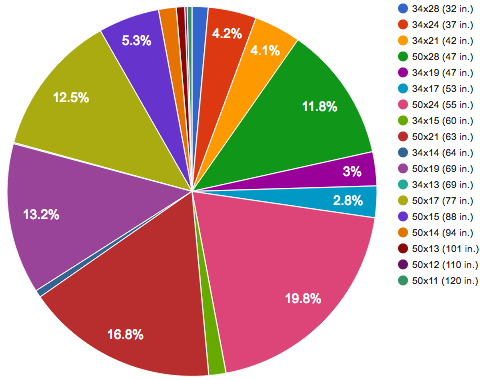
With an extra bit of hardware, the Edge 820 will communicate with your Shimano Di2 electronic shifting groupset. That allows me to display which chainring and cog I’m in (both numerically and graphically), as well as the system’s current battery level. It’ll beep when you’re at your absolute highest and lowest gears, and give you a text alert if the Di2 battery goes below 25 percent charge. On top of all that, all your shifting data gets added to your ride logs, which you can analyze later through sites like di2stats.com.

The Negatives

The touch screen is really poor… nearly unusable. Every interaction with the unit must be very deliberate, and often repeated. My unit is barely tolerable, but many people have simply given up and returned theirs for a refund. It’s terrible.

Scrolling and zooming the map are incredibly slow. Like, almost unusably slow. If there’s one thing a mapping GPS should get right…

Loading and calculating routes is even worse! If I have a stored GPS breadcrumb track, it shouldn’t take upwards of five minutes for the unit to begin offering navigation cues. Why would it take even longer than the Edge 800?

When I first started using the unit, it spontaneously turned itself off several times. Fortunately, after a little while, that stopped happening.

Along with SMS and incoming call notifications, it would be nice if the unit offered incoming email notifications, as well. Missed opportunity.

I had a lot of trouble setting my Max Heart Rate. By default, the unit will override any number you specify with whatever it gets from a heart rate sensor. But since HRM straps are notorious for occasionally giving ludicrously high readings (e.g. above 220 BPM), it kept resetting itself until I shut off the auto setting and entered a fixed HR max.

Presumably, the Edge 820 supports Live Track, where you can send a URL to a friend, and they can visit a site that shows where you are in real time. In my experience, the data connection to the phone is too fragile, and I’ve never gotten Live Track to work… not even once. Both Google Maps’ Location Sharing feature and the Glympse app work far better.

Then there’s Group Track, where you and your riding buddies can presumably “Live Track” each other, with the head unit displaying the locations of your other riding buddies in real time. Even if I had other riding buddies with compatible head units (not very likely), the fact that it depends entirely on the utterly non-functional Live Track feature means I can’t use it anyways.

That cool Shimano Di2 integration I talked about above took *way* more time, effort, and money than it should have. First, to get the Di2 to talk to the Garmin, I knew I had to order and add a tiny wireless transmitter and a cable to my Di2 system, plus the special tool to connect the cable. When that didn’t work, I learned that I also had to order and replace my old battery mount. Tiring of the runaround when that didn’t work, I brought it in to the bike shop, where they individually updated the firmware on every piece of my Di2 setup. That didn’t work, either, so I ordered a new front junction box, plus two more new cables. When those came in, we installed them and did two more whole rounds of firmware updates during several phone calls with Shimano support. Then we finally had to pair the Di2 transmitter with the Garmin, and iron out a few minor bugs in the system (not reading battery level, thinking it had 11 sprockets rather than 10). In the end, it took a couple months, three trips to the LBS, a few calls to Shimano support, seven new parts from four separate orders, and an extra $450 in parts and labor to set up, just for my head unit to display what gear I’m in. Had I known that at the beginning, I never would have bothered.

The Bottom Line

Ultimately, the unit mostly works, and is generally okay. It’s a good step up from my aging Edge 800. I like the auto-upload, custom data fields, Di2 integration, phone and text message notifications, and Strava Live Segments. And I’m hoping that the FE-C trainer integration works well. But none of those are must-haves, so I wouldn’t say I’m blown away by the new features.

On the other hand, a lot of people really hate the unit, and I can understand why. The touch interface is terrible, basic functions such as loading routes and map data are ridiculously slow, and key features like Live Track, Group Track, and incident detection simply don’t work.

While Garmin enjoyed a market-leadership position in GPS cycling computers for several years, riders who are frustrated with Garmin’s lack of responsiveness are turning to other vendors, now that quality alternatives are available like the Wahoo Element Bolt.

By all measures, the Edge 820 should have continued Garmin’s domination of the GPS cyclocomputer market. I really hope they have learned the drawbacks of releasing such a flawed product and do a better job next time. In the meantime, hopefully they’ll keep issuing firmware updates that fix the Edge 820’s broken features and provide more compelling functionality.

It’s still a good unit, but it’s definitely not the category-redefining product that I had hoped it would be.

As you would expect, my first year riding in Pittsburgh was eventful and full of new experiences. Judging by the size of this 2016 year-in-review post, I consider it a pretty successful year overall.

Here I’ll review my original goals for the year, plow through a list of other noteworthy developments, show you a few informative charts, and then close by looking forward to 2017. All accompanied by a handful of related photos.

Ornoth"s MS Ride
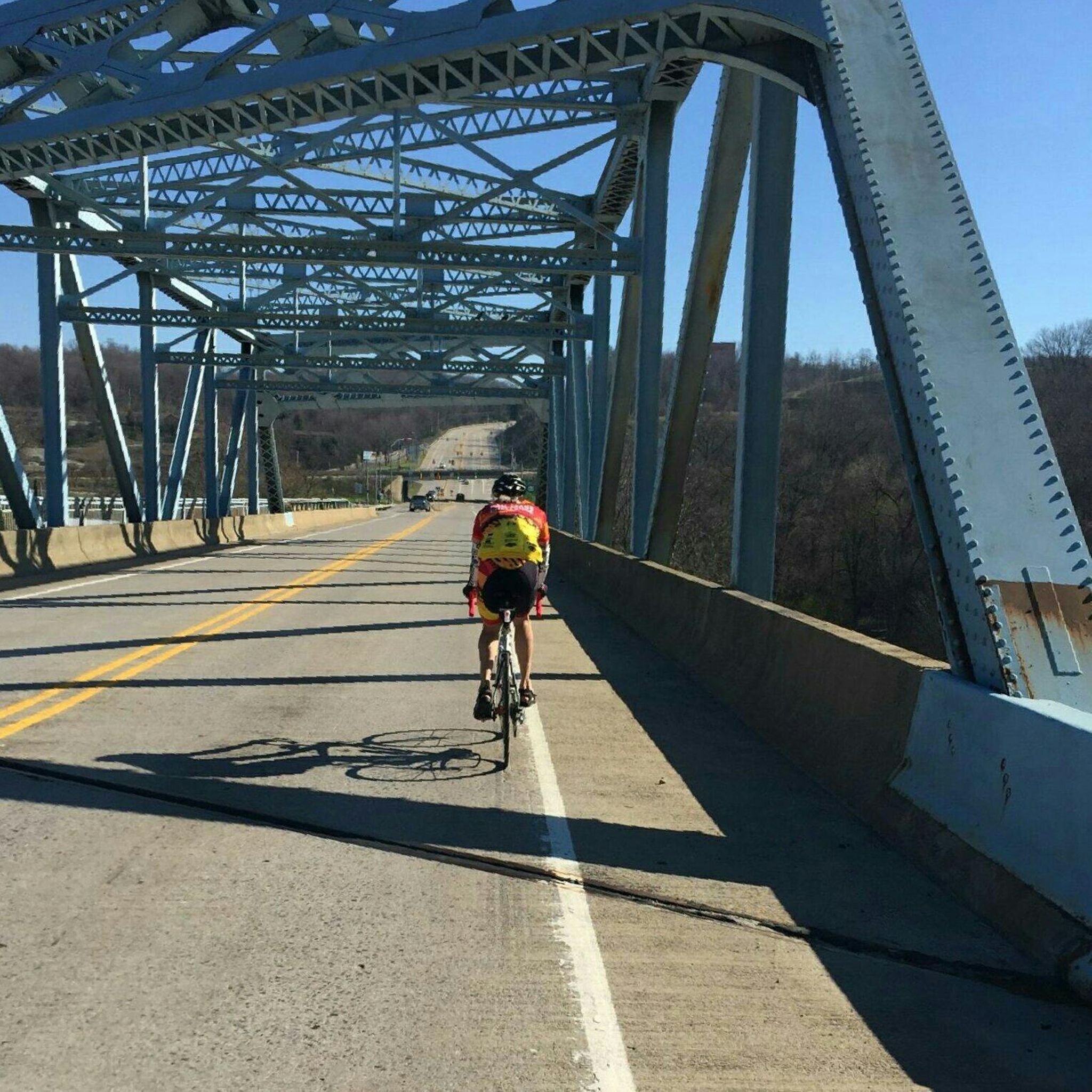
Ornoth climbing segment one
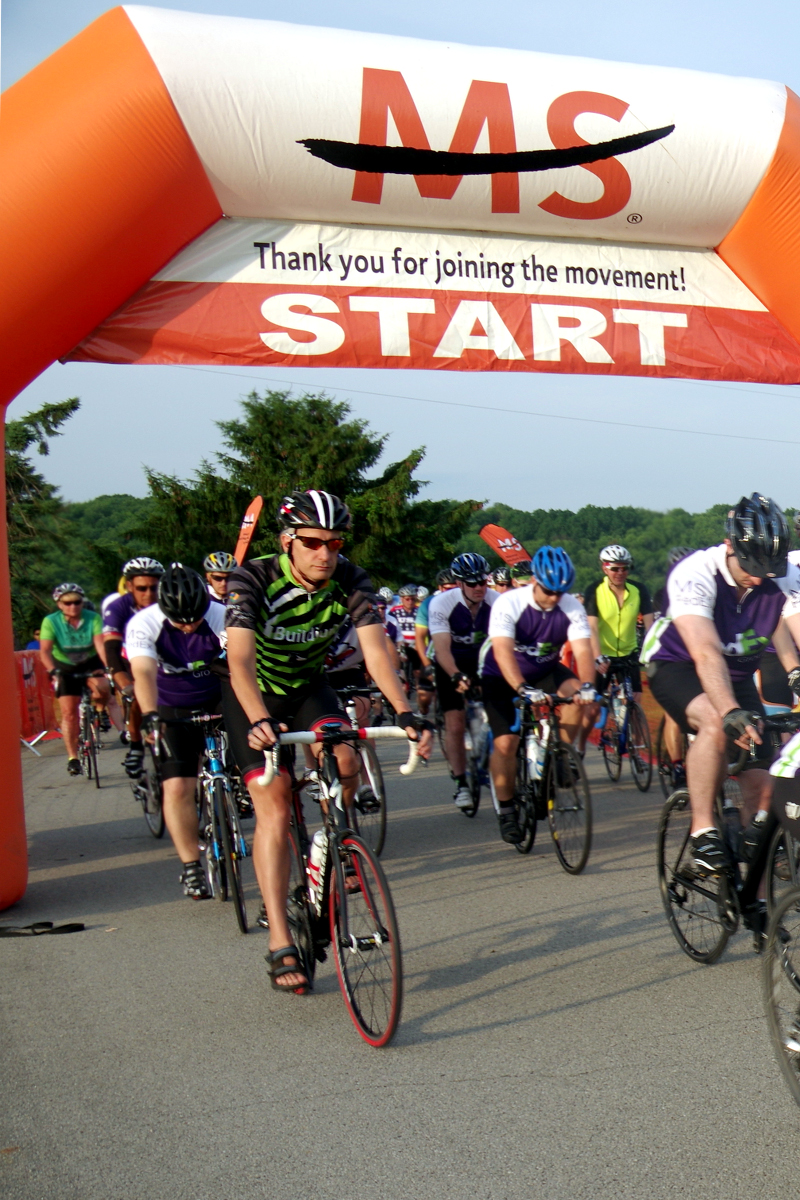
MS Ride start
50,000th Mile
Ornoth hammering
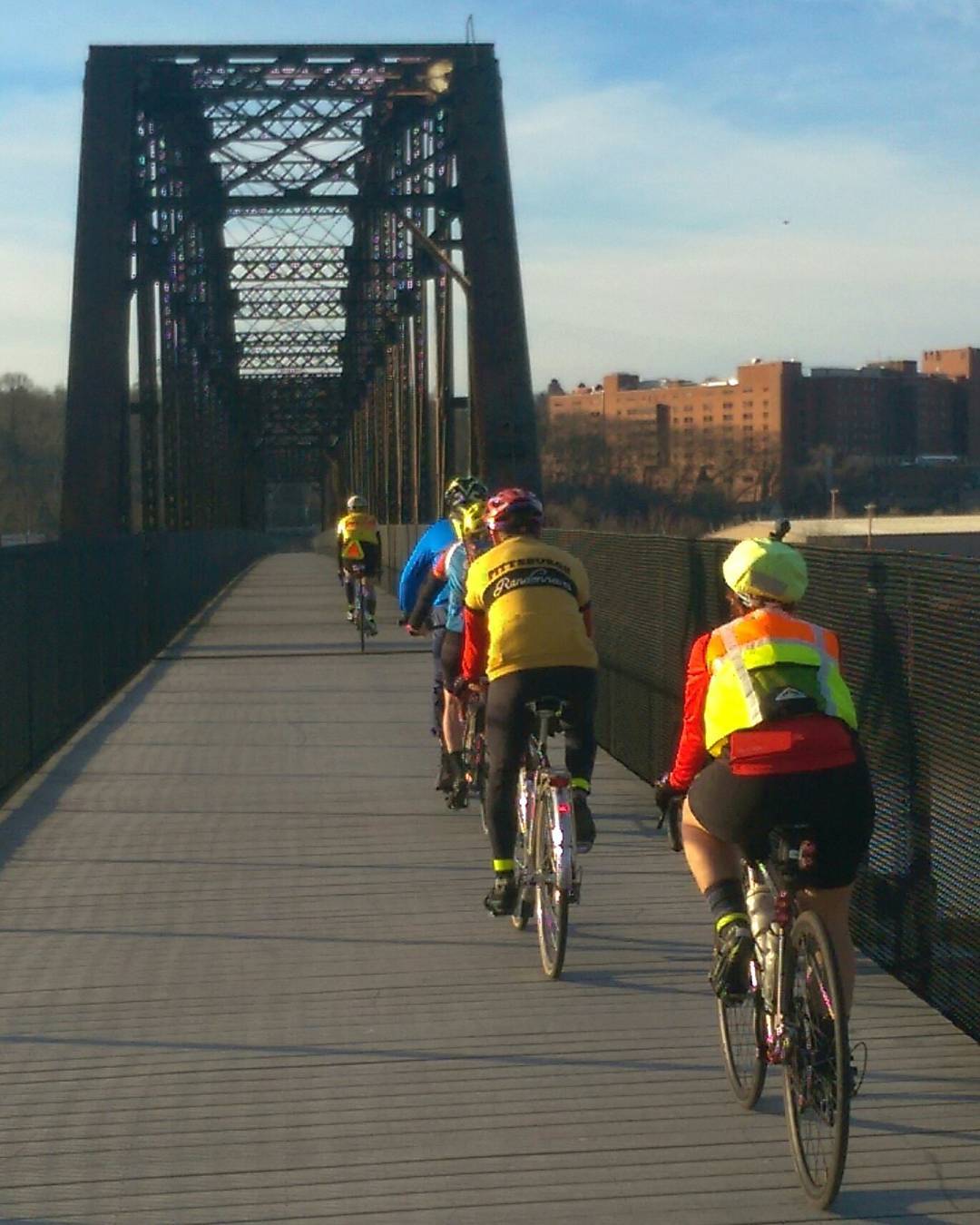
Pit randos crossing the Mon
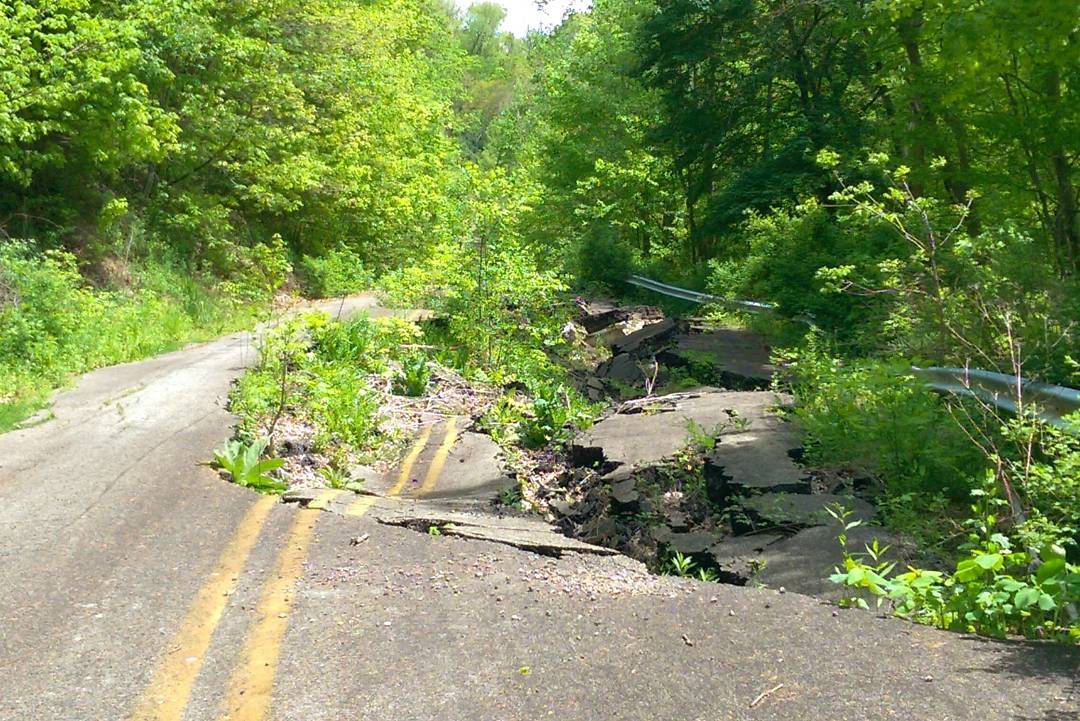
Collapsed roadway
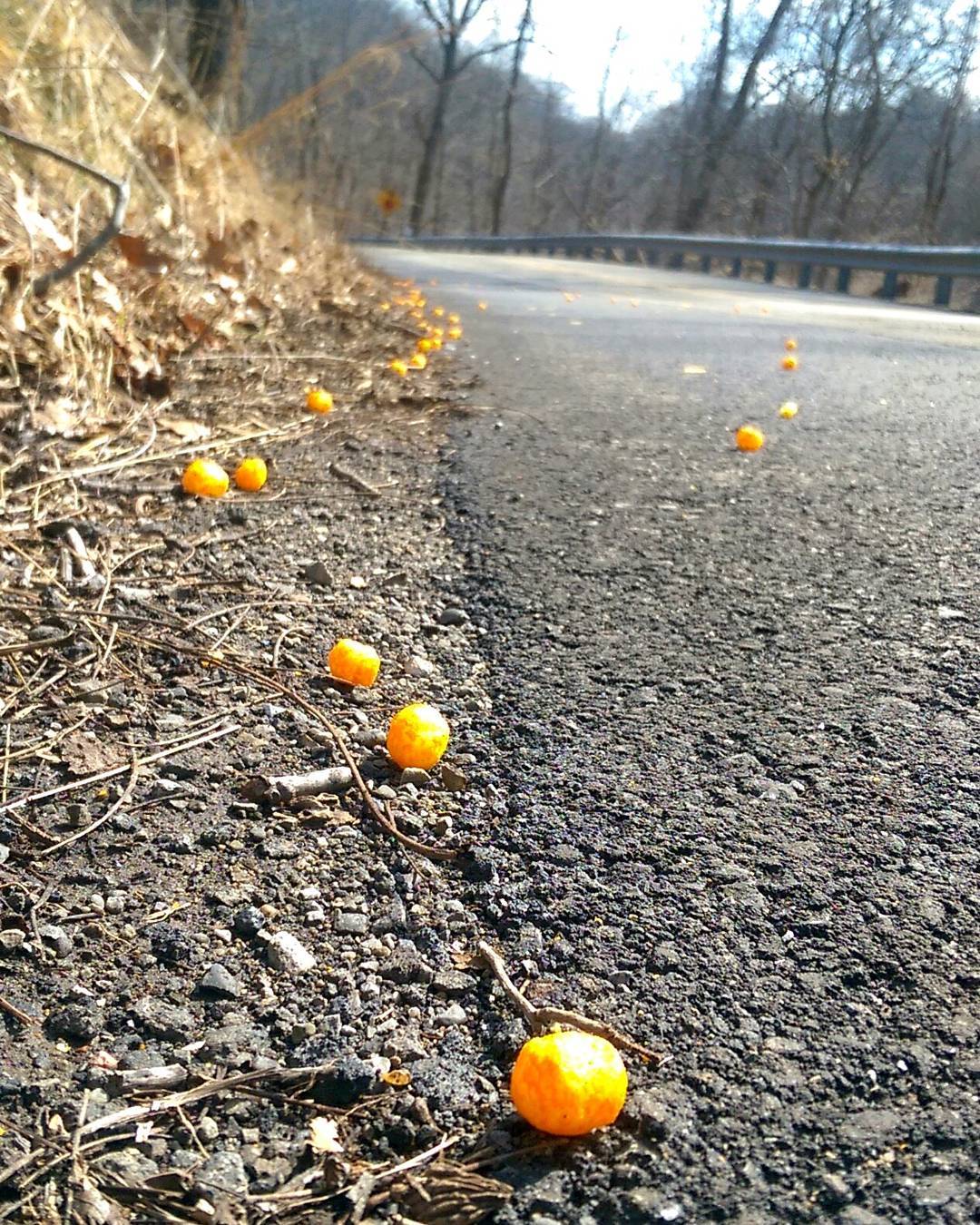
Cheez ball spill

Original 2016 Goals

When I moved to Pittsburgh at the end of last year, I set four explicit goals for myself, plus two implicit ones. How did we do?

First goal was to buy a new indoor trainer. It didn’t happen because nice weather allowed me to ride outdoors throughout last winter, and I wanted to conserve cash. Although I never got that new trainer, I can’t call saving hundreds of dollars a failure! And there’s always next year…

Second goal was to do more century rides than the feeble four I had done in 2015. I bagged seven, one of which was a 200k. Great success! To enumerate them: Pittsburgh Randonneurs’ McConnell’s Mill 200k (a new all-time record for most climbing in one ride), Escape to the Lake MS ride, a solo century to Brush Creek, the Pittsburgh Tour de Cure Gran Fondo, the Western PA Wheelmen’s 3-State Century, the Mon Valley Century, and the Pedal the Lakes Century.

Third goal was to check out Pittsburgh’s outdoor cycling track. Definitely did that, and set my first personal hour record there (20.77 miles). But I didn’t participate or even spectate at any of the races held there… Yet!

Final goal was to ride the Dirty Dozen. Sadly, family obligations brought my season to a screeching halt just after I started training for the Thanksgiving-weekend ride. This one has to wait for next year.

My two implicit goals were to ride more than I did in 2015, and to learn and become familiar with the roads and routes used by Pittsburgh cyclists. I covered both of those without question.

Overall, I did a reasonable—but not perfect—job of meeting my original goals for the year.

Innumerable Highlights

But the story of a season isn’t made up solely of chasing predicted goals. It’s also a collection of serendipitous moments and unexpected developments. And 2016 was a very eventful year.

How come? Here’s a quick run-down:

  • I opted to take the summer off from work, giving me lots of free time to ride.
  • I rode more miles in 2016 than I did in any my past six years except for 2014.
  • Overall, my average distance per ride is down, but my climbing per ride is way up, and I rode much more frequently this year.
  • I rode my first brevet in ten years, my first-ever gran fondo, and my first personal hour record on the track.
  • I rode to a town called McMurray in memory of my mentor Bobby Mac, did the PedalPGH and Every Neighborhood rides, rode from home into West Virginia and Ohio, around Saratoga New York on vacation, through a cheeseball spill, and to a town called Bagdad over two closed roads that were broken up and collapsing down the hillside!
  • I rode in regular group rides with Team Decaf and the East Liberty Performance Bicycle shop guys.
  • But I lost out on the Dirty Dozen, its training rides, and the 321 cancer charity ride I’d planned on doing.
  • I met a lot of cool riders, including Stef Burch, Monica VanDieren, Jim Logan, Eric Collazo, Kai, Colleen Spiegler, Ryan Popple, and many, many others.
  • I had one nontrivial crash due to debris in the road, resulting in some road rash and a quick trip to the walk-in clinic.
  • Rode in two processional rides in memory of local riders who had been killed by motorists.
  • Michelin replaced my standard Pro4 line of tires with a new model called Power Endurance. When I was accidentally sent 25mm tires rather than my preferred 23s, I opted to stick with them. They’re more comfortable, and wider tires are a new trend with many riders.
  • Also bought a Continental 4-Season rear tire for wintertime traction.
  • I destroyed another rear wheel, but replaced it with a new Ksyrium with an all-black Exalith brake track that whines evilly whenever I’m slowing down. My bike shop forced me to impersonate a shop employee in order to get my warrantee registered.
  • I bought a couple Ass Savers, a hub-level video camera mount, several new jerseys, caps, and a really nice new insulated winter cycling jacket.
  • I started playing in the BikePGH forums’ Tag-o-Rama photo-finding game, finding and setting four sets of tags. Also bought a cycling card game called Attack the Pack.
  • Bought a new set of Oakley Half Jacket sunglasses, with ear socks and lenses to match my bike’s red and white color scheme. Also attached plastic stick-on reading lenses to those sunglasses, making it much easier to read my GPS bike computer, especially when navigating unfamiliar areas (like all of Pittsburgh!) by map.
  • Although I haven’t bought the new Garmin Edge 820 GPS cyclo-computer, I did buy some electronic widgets that will allow my future head unit to talk to my Di2 electronic gear shifters. More on that in the future!
  • Lost my only Strava KOM up in northern Vermont, but gained a new one located behind Allegheny General Hospital in Pittsburgh.
  • Was shocked to hear that Dirty Dozen founder and Pittsburgh cycling legend Danny Chew had been paralyzed in a crash.
  • Surpassed 10,000 miles on the “new” bike (R2-Di2), and broke 50,000 miles overall since 2000.
  • Ordered a fistful of Camelbak Jetvalve water bottle tops, because those things grow mold like crazy and are difficult to clean. They’re rarely sold separate from the bottles.
  • Added searchable tags to my cycling blog, so that you can now navigate my posts by topic.
  • Finally paid for a Strava Pro membership. Between Strava and the Stravistics add-on, I got all kinds of new features, including:
  • Started automatically posting ride photos to my Strava page via my Instagram feed.
  • Access to my Strava “trophy case”. On top of old challenges from years past, this year I earned eight monthly gran fondo badges, four monthly climbing challenge badges, and one special challenge badge.
  • I used the Flyby feature (example) to identify similar riders in my new neighborhood and learn the routes they favored. And I used Strava’s Global Heatmap to see overall popular routes in Pittsburgh.
  • One of the coolest things I did this year came about because I wanted something no other website provides: a way to directly compare the slopes and lengths of hills against one another. Being a techie and data vis geek, I started hitting the Strava API and created my very own Slope Comparison Tool. It’s really awesome and I’m really proud of it.
  • And then there were some new data plots that I discovered: my personal riding heatmap, my yearly elevation gain chart, and my training/fitness chart.

Let’s go into those charts in a little more detail, since they are extremely pertinent to any discussion of my 2016 season.

Teh Plotz

I told you that one of my implicit goals was to learn Pittsburgh’s roads. My 2016 mileage total was 3,260, which is greater than four of the previous five years, so I definitely covered a lot of territory.

But it’s easier to show you that on a heatmap than it is to talk about it. Here’s a static image of my 2016 riding, which shows a lot of riding around the city core and numerous expeditions further afield.

However, you can get a much better understanding by clicking through to the actual interactive map to pan and zoom around.

Custom personal heatmaps are one of the awesome features that came with my paid Strava membership. I have another map depicting all my riding (since 2010), both before and after my move from Boston to Pittsburgh.

Pittsburgh heatmap

Next comes a truly amazing chart, which shows something my blogposts have belabored: how hilly Pittsburgh is in comparison to Boston.

The chart depicts how much elevation gain (i.e. climbing) I did each year. From 2010 through 2015, while living in Boston I climbed anywhere from 87,000 to 120,000 feet (16 to 23 vertical miles) per year.

Now look at the pink line for 2016. At the end of September, I had 190,000 feet of climbing: nearly twice my previous record for that point in the year! If I had ridden at the same pace for the last three months of 2016 I would have broken a quarter million feet (48 vertical miles) this year. But I didn’t, so I had to settle for a mere 36 vertical miles…

That chart is from the Stravistix add-on for Strava, which adds all kinds of useful information above and beyond what you get from Strava itself.

Climbing chart

Finally, I’ve got two versions of this year’s TRIMP chart, which I described in detail in this blogpost. The first one tracks this year’s fitness, and the second lets you compare 2016 to previous years.

Here’s what you’ll see below:

This past season began with a great build-up from mid February through the end of March. The next month and a half were plagued by mechanical troubles, travel, and bad weather, except for that mid-April brevet I rode: my longest ride of the year. There followed three and a half months of enjoying long summertime rides and steadily-increasing fitness, culminating with the Pedal the Lakes Century on September 4.

After that, I kicked off my Dirty Dozen training rides. Although I was building up leg strength, my fitness chart started trending downward because I wasn’t riding as often or as far; I was just banging out the steepest hills, then taking time off the bike to fully recover.

Dirty Dozen training went well enough until my mother got sick and I left for Maine, which abruptly terminated my season. The chart clearly shows the resulting precipitous decline in fitness from its late-August peak. See?

As with almost all images I post, you can click through for the full-sized version.

2016 TRIMP fitness chart

That’s a tactical view of 2016, but how does this season compare with other years? That’s what we see when we zoom out to a TRIMP / fitness chart for the past six years.

What you immediately notice is that the winter dip from 2015 to 2016 isn’t as deep as any previous year. That—and the irregular jagginess of the curve—reflects the fact that I managed to ride outside a lot last winter; whereas indoor trainer work would appear more regular, like what you see through the winter of 2014-15. Riding outside allowed me to start 2016 at a measurably higher fitness level than usual.

You also see some of the things I mentioned above: the early spring build-up, followed by a brief dip, then a very productive summer season, and a complete drop-off for the last four months of the year.

In terms of the absolute peak fitness I achieved, my max has been pretty consistent over the past three years. See?

2011-2016 TRIMP fitness chart

These two charts are also available as a part of a paid Strava membership. I found them—and especially the underlying form and fatigue data that I haven’t shown here—insightful and very useful in preparing myself for major events this summer without over- or under-training.

2017 Goals

That’s all I want to say about 2016, which leads into the next logical question: what will 2017 look like?

There are a handful of things that I definitely want to accomplish next year, and a couple open questionmarks. Let’s start with the easy ones first.

I plan to purchase and learn how to use a new Garmin Edge 820 GPS cyclo-computer, replacing my reliable six year-old Edge 800. I’m really excited about the many new features it offers, some of which I describe in this post.

I would like to ride both days of next year’s Escape to the Lake MS Ride. This year, I only rode the first day because it was a century and Day 2 was not, and because I could avoid worrying about hotels and overnighting and return transportation. However, Day 2 ends on the shore of Lake Erie, which I have yet to visit, and I think I might enjoy completing the entire event.

I plan to ride next October’s Woiner Cancer Foundation 321 Ride. This year I registered, fundraised, and got the ride jersey, but couldn’t participate due to my mother’s hospitalization.

And it goes without saying that I want to attempt my first Dirty Dozen next year. After several years of anticipation, in 2016 I was all set to take on that challenge, until life intervened. Now having ridden almost all of those hills, I really want to add that ride—and the steepest public street in the world—to my palmares.

Those are my main goals. What about the ones I said were questionable?

One is a 2016 goal that I deferred on: the purchase of a fancy new indoor trainer. That wasn’t necessary last year because Pittsburgh had a very mild winter, and I was trying to save money. The need is still there, but only time will tell whether I need to pull the trigger on it or if it can wait. But I won’t get any indoor or outdoor riding done during this extended stay in Maine.

And then there’s the employment question. Having a job is nice, and it does introduce the possibility of commuting by bike, but it also restricts how much time I can spend in the saddle. Although employment is a non-cycling goal, I’m definitely hoping that I can mesh those two aspects of life together successfully. But that’s also contingent on getting back home again.

That wraps up the end-of-season retrospective. I enjoyed my first year in Pittsburgh, and it was very eventful from a cycling perspective. I learned a lot, got some cool new gear, set benchmarks as well as some new records, met a lot of people, and experienced a whole lot of territory.

Here’s hoping for an equally enjoyable season in 2017!

Amongst cyclists, there are mixed opinions about Strava, the social network that promotes tracking, analysis, and sharing the GPS logs of one’s rides.

There’s no question of the value it provides. But there’s been a bit of backlash from non-competitive riders who think preoccupation with “the numbers” detracts from the pleasure of riding. While that might be how it is for them, that doesn’t confer upon them the right to judge others for whom Strava’s information actually enhances their cycling experience.

Like many sites, Strava gives free users access to most of their functionality, but saves some advanced features for paying members. For myself, the ability to create my own heatmaps wasn’t sufficient reason to pay for access. However, a recent offer of a free month of premium access finally lured me in.

Although it’s not the main point of this post, the first thing I had to look at was those heatmap charts. A year and a half ago, I put together my own heatmap of a year’s worth of my cycling in Boston, which you can see here.

In comparison, here’s Strava’s heatmap of all the 500+ rides I’ve logged since 2010. Click here or on the image to get through to the interactive map where you can pan and zoom around.

Ornoth's cycling heatmap

They also let you generate heatmaps for a particular calendar year or an arbitrary date range. So here’s another chart showing where I’ve ridden since moving to Pittsburgh back in December. Click thru for the interactive version.

Ornoth's Pittsburgh cycling heatmap

Clearly they’re more flexible and less work than creating my own from scratch.

Another premium feature worth a brief mention is the “trophy case”. Strava offers monthly climbing or mileage “challenges” to all riders, but when a paying member completes a challenge, Strava adds little badges on the “trophy case” section of their rider profile page.

Gran Fondo challenge badge

Since those aren’t shown for free users, I never paid much attention to the challenges I’d completed, but now they all show up on my rider profile. In 2014 I completed four monthly “gran fondo” challenges plus one long “summer challenge”. In 2015 I added three more gran fondos. And thanks to favorable weather, I’ve already completed two more this year, and will complete my first monthly “climbing challenge” in a couple days.

That’s all nice, but it’s not the premium feature that I really want to show you. The main point of this post is the “Freshness & Fitness” chart, which I want to explain in some detail, because it’s cool.

For visual reference, here’s my fitness chart for the past 12 months. Click the image to see it at full size.

One-year fitness chart

Look first at the histogram across the bottom. Each one of the vertical lines represents a ride. Each line’s height represents the ride’s difficulty, based on its intensity and duration, and is called its “training impulse” or TRIMP or “suffer score”. The harder the ride, the taller the line. Above, I’ve highlighted last September’s late-season Hub on Wheels ride; it was a very intense three-hour ride, which is reflected in its training impulse value of 315.

Now look at the main/shaded/dark/bold line on the line chart above. That’s a different measurement called “fitness”, which represents my overall strength on the bike. You’ll see that every time I do a ride, my fitness goes up in proportion to how hard the ride was. So when I ride, I get stronger, but it gradually declines on days that I don’t ride.

There’s a spike at the Hub on Wheels ride where my fitness jumped up from 26 to 33, then slowly declined to 22 over the next three weeks while I was off the bike. Similarly, I was at peak fitness in June after riding hard and often, but my overall fitness declined through July and August, when I rode considerably less. Technically speaking, fitness is a weighted average of the training impulse for the previous six weeks.

There’s another metric that I haven’t shown here in order to keep the chart clean. We all know that after a hard ride, it can take a couple days of rest for your body to recover before you can go hard again. To take that into account, there’s another metric called “fatigue”.

Like fitness, fatigue increases in proportion to how hard you rode. After Hub on Wheels, my fatigue rose from 6 to 47. But it takes only a few days to recover from fatigue; a week after the Hub ride, my fatigue had gone back down to 17. In technical terms, it’s a weighted average of only the past 7 days’ training. While the positive effects on fitness of training last a long time, the negative impact of fatigue does not. That’s fatigue.

If you’re training to get ready for a big event, both fitness and fatigue matter. You want to have trained hard and built up your fitness, but if you’re still suffering from fatigue, you’re not going to perform at your best. If you take your level of fitness and subtract your residual fatigue, you get a number which they call “form”. Form is the thing that really matters when it comes to predicting how you’ll perform on any given day. And that’s what the thin/light/grey line on the chart represents.

Looking at that light grey line on my chart, during my heavy training period in the spring and early summer my fitness rose to its peak, but my form never got especially good because I was so fatigued. But I rode a lot less after my major event at the end of June, which allowed my body to fully recover. Looking at the chart, my form didn’t actually peak until late July! Going into Hub on Wheels, my form was a moderately good +20; after riding so hard, it fell to -14; but after a week of recovery it was back up to +11.

For another explanation of all this, try this 3-minute video from TrainingPeaks, although they use more technical names for these elements.

Stepping back, that chart gives a good overall picture of how a cyclist’s year progresses. You start with low fitness over the winter. In the spring you gain fitness by doing hard, long rides, but those leave you really fatigued, so you’re not at your best until you’ve taken the time to recover. That’s why you have to taper your training in the week leading up to a major event, so that you’ll be fresh (less fatigued) and thus at peak form. And then in the fall you can finally enjoy being highly fit without having to train hard or endure the associated fatigue.

In addition to 6- and 12-month views, Strava will also display all of your historical data, which for me goes back five years to 2011. That’s shown in the chart below, which only contains my overall fitness, with the expected troughs in the winter and peaks in the summer. Again, click for bigness.

Five-year fitness chart

There are some really interesting things to see here, too.

What immediately jumps out at me is that each year’s peak fitness was greater than the previous summer. New cyclists experience this year over year improvement as their body responds to the training load and becomes ever more attuned to cycling. You don’t just get fitter from winter to summer, but you also improve from year to year. Although I wouldn’t have expected to see that trend continue for someone who has been riding for 16 years, apparently I trained harder each year from 2011 to 2015, as shown by my peak fitness values, which went from 44 to 57, 62, 74, and 73.

The wintertime troughs are also interesting. The winter of 2011-2012 I barely rode at all, which is why you see a smooth decline in my fitness (down to a sad little value of 1). Skipping ahead, in 2014’s off-season I tried to ride outside sporadically, which is why you see some big jaggies there. But the most interesting years are 2013 and 2015, when I regularly used the indoor trainer. Riding the trainer produced numerous short little saw-toothed increases in fitness, which added up to provide a good base of fitness and a head start going into the arduous spring training season.

And finally there’s this past off-season. You don’t see any evidence of indoor trainer last winter, but Pittsburgh provided enough nice weather to ride outside regularly, and enough obscenely-difficult hills to really amp up the “training impulse”. So much so that according to this methodology, I’m as trained-up and fit now (in March) as I normally would be in the latter half of May!

Being two months ahead of my usual training curve is probably a good thing, knowing how much more climbing there is in the average Pittsburgh ride than back in Boston.

These are only a few of the features that Strava offers to premium users. For you, they may or may not be worth the expense; it took me five years to even look into it seriously for myself. But I thought I’d share some of the insights that you can gain.

Of course, you can get this kind of information (and more) from other performance management software such as TrainingPeaks, but getting it as a part of Strava Premium is pretty convenient for me. And Strava provides a social network that makes it easy to share with other riders and anyone who reads this blog.

And while we’re here, if you like this kind of stuff, don’t forget to install the Stravistix Chrome browser add-on, for additional analysis of your Strava datums!

Swan Dive

Jan. 23rd, 2016 12:51 pm

As I mentioned in my last post, multiple people pointed me toward Oscar Swan’s book “Bike Rides Out of Pittsburgh” as the best way for a new resident to get up to speed on cycling routes around the city.

Having read the book, here are my impressions, in hopes of setting expectations for any other riders in my position.

I can kinda see why people recommend the book. It’s both thorough and authoritative. As I see it, here are the book’s pluses:

  • It’s available for free loan from the Carnegie Library. Yay!
  • It details no less than 425 different rides surrounding the city in all directions. There’s no shortage of routes to choose from.
  • It is a great resource for learning the locations of all the suburban towns around Pittsburgh.
  • Because rides are grouped roughly by major routes out of the city, it’s also a good way to identify the most likely roads you’ll take to get into the open countryside.
  • Because it covers nearly every road in a 75-mile radius of town, it gives the impression that you can bike pretty much anywhere… at least in theory.
  • There are quite a lot of photos.

Although it’s a great resource for the above purposes, the book has a lot of problems, too. Despite the number of recommendations I received for it, my impression is that—as a local might say—“It ain’t all ’at.” Here are its negatives:

  • To begin with, it’s out of print. If you want to read it, you have to find someone who has it and borrow it, or (a plus mentioned above) get it from the library.
  • Secondly, it’s out of date. It was printed in 2005, and since then several roads have been renamed, renumbered, rerouted, reconfigured, or superseded.
  • Most challenging was the fact that there isn’t a single map in the entire book: neither a broad regional map showing the general overview nor any maps of individual rides. The only way to know where these rides are located is to cross-reference them with a highly-detailed map, which is exactly what I did, creating my own Google Map of all his routes.
  • Which is how I discovered another major challenge: Swan covers pretty much every single road within a 75-mile radius of the city, all the way into West Virginia and Ohio. Where a new rider might be looking for a handful of the nicest rides, the author gives you every conceivable route.
  • That wouldn’t be bad, except that he also doesn’t give the reader any information on which to compare routes. His descriptions are all barebones directions: On this ride, go left on Broad, right on Main to Maple, and return on Summer Street. The author doesn’t add any more information than what you’d get from the sparsest little cue sheet.
  • The kicker is that the book wasn’t proofed at all. In building my Google Map, I learned things that casual readers would overlook: that the author sometimes misspelled the names of roads, and surprisingly frequently mixed up his left and his right. There were places where his directions assumed local knowledge, such as giving directions based on where a former landmark used to be, and included extraneous information like a route being some particular local rider’s favorite, without giving us any idea who that rider was or why we should care. In several instances I had to leave part of a route off my map because the directions were so opaque that they couldn’t be deciphered. It’s definitely written for local residents, not for people new to the area.

From this you can correctly infer that my reaction to the book is mixed. I certainly derived a lot of value from the intensive month-long process of meticulously mapping out each ride; but the whole point of a book like this is to spare new residents such arduous, painstaking effort. And I still don’t know which roads are the good ones!

Although I was hoping to find a list of the best riding Pittsburgh has to offer, what I found was pretty much a bare list of a thousand roads, with no way to judge which ones I should explore first. Imagine trying to decide where to ride based on the red lines in this map (my plot of the author’s suggested routes):

Map

Note: I will not share the URL of the Google Map out of respect for the author’s copyright on his material.

A new resident would be much better served by a book that did the following:

  • Only describe the top 10 percent of those 425 rides: the nicest, safest, most interesting rides in the area.
  • Describe those in detail: not just unadorned directions, but what each route is like and why it might appeal more than any other ride in the book.
  • In addition to photos, include both overview and detailed maps to provide a visual image of where the routes start, end, and the places they go.
  • Include turn-by-turn directions in cue sheet form in an appendix, or drag yourself kicking and screaming into the 21st Century by providing downloadable GPS tracklogs!

Yes, Swan’s book is one place to start in the effort to learn the local terrain. It’s helpful, but it’s nowhere near as helpful as it really ought to be in order to encourage more people to get out on their bikes, whether they’re veteran roadies who just moved into town or locals who are looking for help as they begin their journey as cyclists.

It’s certainly a good start, and illustrates the information cyclists needed back in the olden days, but if Pittsburgh wants to become a modern cycling city, it needs better.

Pairing deep natural curiosity with the desire for a new programming challenge often produces great results. Such was the case with my recent addition of a Cycling Heatmap page to the biking section of my website.

I’ve always been a map geek, going all the way back to the neighborhood street maps I drew when I first started grammar school. I got my first handheld GPS back in 2000, well before such things were common, and before the government stopped intentionally inserting a random offset in order to make civilian GPS unnecessarily inaccurate.

Naturally, that interest also manifested in my career as a web consultant, where I used the Google Maps API for one client to display the locations of warehouses, delivery trucks, and customers, so that they could optimize their delivery routes.

As a cyclist, when I first saw the Strava Global Cycling Heatmap, I was pretty excited. For the first time—and for any location on the planet—we can see what roads cyclists (as a class) actually prefer to use!

Great data, but it also spurred my curiosity about my own road use. With years and years of cycling GPS files on hand, I have plenty of data; all I had to do was figure out the technical details of extracting it, summarizing it, and displaying it.

Ornoth's Cycling Heatmap

That’s where it got hairy, firstly because my cycling GPS no longer outputs user-friendly, text-based GPX files, but compressed binary files in Garmin’s proprietary FIT file format. It took a while, but I was able to hack Kiyokazu Suto’s Garmin::FIT module and fitdump perl script to get the latitude-longitude points I needed out of Garmin’s obfuscated FIT files.

Then I had to find software to generate a heatmap. That seemed easy enough, but it took several tries to find one that could handle anything more than a minuscule quantity of data. I gave up on Google Maps API Heatmap Layer, because their heatmap layer is limited to a pathetic 1000 data points. I looked at Leaflet, Highcharts, Mapbox… Nothing looked promising.

Finally I went back to Google and discovered that if you pair the Google Maps API with a Google Fusion Table in just the right way, it will accept up to 100,000 data points, which is closer to what I needed. So we gave that a shot. Even though the documentation for the known-inadequate Google Maps API heatmap layer was incestuously interwoven with the possibly-useful Google Maps API Fusion Table heatmap documentation, which caused a lot of unnecessary confusion.

Unfortunately, 100,000 points was only about one month of cycling data, so I had to write a script to further summarize my data before feeding it into a Fusion Table. Basically, I rounded my lat-long values from seven to just three decimal points and threw out consecutive duplicates, which reduced the dataset quite a bit.

It also had a side-effect of cleaning the data up. Since my GPS logs location once per second, points were more densely-packed when I was moving slowly, and more sparse when I was moving quickly. Plot that on a heatmap, and it would look like I rode more often in places where I went slowly! But rounding the lat-long values abstracted all those low-speed duplicate points down to one, which fortuitously made tracks display more evenly no matter what speed I rode at.

Finally I had to load my data into a Fusion Table. In the end, by rounding my data I was able to get 14½ months of rides into 98,870 points, representing all 122 rides I took from July 1 2013 through September 15 2014.

How pleased am I with the resulting map display?

Well, it satiated my curiosity about where I ride, and it also was a fun way to brush up my technical chops in terms of cartographic programming skills. I don’t know if any other cyclists will care or benefit from looking at my usual routes, but it would be neat if that were true.

Overall, I’m happy with the result, but it certainly has some externally-imposed shortcomings, all ultimately traceable back to the fact that I had to squish all my data down into 100,000 points.

Because I had to round off my lat-long values, the tracks I only rode once can be seen when the map is zoomed out, but the points nearly all disappear when you zoom in!

If I had more control over the heatmap’s appearance and color-groupings, I could probably fix that, but because those heatmaps are generated on Google’s server rather than the browser, they have provided virtually no options for customizing its appearance.

The rounding also becomes painfully obvious when you zoom in, as what appear to be linear tracks ultimately separate into evenly-spaced individual dots, just like looking at a halftone print under a magnifying glass. At high resolution, it becomes so painfully ugly that I had to programmatically restrict the user’s ability to zoom in!

Ugh! The tradeoffs and limitations give me the shivers. But at certain zoom levels, the result is pretty usable.

Did I learn anything new about my riding? Not that much, since I’m already pretty familiar with the roads I use.

I already knew that I spent a lot of time in Back Bay, on Mass Ave out to Lexington, doing the Quad loop around Concord and Carlisle, and also heading out Charles River Road to Watertown, or Beacon Street to Weston, and Glezen from there out to Sudbury.

I was pleased to see the presence of some new roads that I’ve added this year: the whole Dover loop, the Mystic Lakes route up to Winchester, and both Trapelo and Concord Ave through Waltham and Lincoln.

Of course, I’m equally amused by some routes that I haven’t done this year, but which appear thanks to the older 2013 data. That would include my former commute down to Quincy, which included climbing Dorchester Heights; hill repeats on Summit Ave in Brookline; and Virginia and Mill Street in Concord, a part of the standard Quad loop that I now usually skip.

I guess the only big, new revelation is that although I live within half a mile of the ocean, I never ride along the north or south shores! To find good seaside riding, I either have to go thirty miles north to Cape Ann, or fifty miles south to Cape Cod!

In addition to last year’s ride data, I would love to incorporate my GPS logs that go back another five years; that would change this map quite a bit. However, the rounding that would be required to jam all that data down to 100k points is so extreme that the map dots no longer correlate with individual streets, so the display winds up being completely worthless.

But for this exercise, I’m pretty happy that I was able to overcome the technical hurdles and produce the reasonably good result you see here, based on a good-sized clump of recent data. It’s a victory and an accomplishment in and of itself!

Well, PMC weekend is here. Are you ready?

I think I’m ready. It’s been an interesting spring, though.

Last fall I got a new road bike—a carbon fiber jobbie I’ve nicknamed “The Plastic Bullet”—and have really enjoyed it, having put 2200 miles on it since last October.

In the first five months of the year, I rode 1500 miles, which included my new 28 mile per day commute and the Boston Brevet Series 200k, a 125-mile ride that I’ve long wanted to do, and completed in eight and a half hours.

Unfortunately, in May and June Boston received record-shattering amounts of rainfall. That, combined with three weeks of travel for work, made it really difficult to train during the months leading up to this weekend.

That business travel also made it difficult to get started on my fundraising. Although I usually send my first letters out at the end of May, this year I waited until the Fourth of July. But despite that, my sponsors have really been very generous, and I’ve already fulfilled my my personal goal for 2006 of raising a record $4,000. That means that over the past six years I’ve raised over over $20,000 for cancer research, treatment, and prevention. I actually think I’ll break $5,000 this year, because I’ve got a dozen more sponsors who haven’t sent their donations in yet!

So if you’ve already sponsored me, let me say thank you once again for your amazing generosity, and the opportunity you’ve given me for doing something so meaningful.

And if you haven’t made a contribution yet, please consider doing so: if not now, then sometime soon (I can take contributions throughout August and September). My page on the PMC site is here— http://www.pmc.org/mypmc/profiles.asp?Section=story&eGiftID=OL0003 —and you can go directly to the donation page here: https://www.pmc.org/egifts/MakeADonation.asp?eGiftID=OL0003

There have been some changes to the route this year. Most notably, we’ll be on the Cape Cod Rail Trail more than we have in the past, as it is partway through being renovated. If you’re interested in looking at it, I’ve created an interactive map of the route using the Google Maps API. You can find it here: http://users.rcn.com/ornoth/pmcmap.html

As usual, New England Cable News will be covering the ride live all weekend. They’ll also have the opening ceremonies Friday evening, and a wrap-up show Sunday evening.

As I did last year, I’ll be phoning in end-of-day posts to my main LiveJournal. So you will be able to get the latest updates at http://ornoth.livejournal.com/

And, of course, shortly after the ride I’ll be posting photos and a writeup of how it went. But right now I’m ready to go, and it looks like it’s going to be an absolutely stella weekend! Even the weather looks to be ideal!

See ya out on the roads!

A final post before I head out to this year’s Pan-Mass Challenge.

My training is complete, and the weather looks like it’ll be absolutely Stella. However, I’m a bit cautious about how I’ll do after having strained my back last weekend helping a friend move. I’d say I’m about 85% right now; I’ll certainly start, but we’ll see if I finish.

If you’re curious about the route, I’ve put together an interactive route map using the excellent Google Maps interface. It’s not done, but the current version can be found at:

http://users.rcn.com/ornoth/pmcmap.html

If you’re local, NECN (New England Cable News channel) will have coverage periodically throughout the weekend, including Friday evening’s opening ceremonies at 8pm and a Sunday evening wrap-up. People further afield can also view some of the coverage on their Web site:

http://www.boston.com/news/necn/Shows/specials/pmc/

As usual, next week I’ll be sending out a short debrief of how my ride went, followed by a complete write-up a week or two later. I’ll also send out a fundraising wrap-up after the annual check presentation to the Jimmy Fund in November.

Fundraising is at about $1,500, which is only half of what I need to raise to meet the required minimum.

I want to once again say thank you to those of you who have made this weekend possible, and for making a meaningful contribution to the very important fight to overcome cancer.

And those of you who have yet to make a donation, there’s plenty of time, as I can accept cash all the way through mid-October. Donations can be made here.

Have a great weekend!

Frequent topics